Cordova — Setup

Installation
ionic cordova plugin add cordova-plugin-background-fetch
cordova plugin add cordova-plugin-background-fetch
iOS Setup
Background Modes
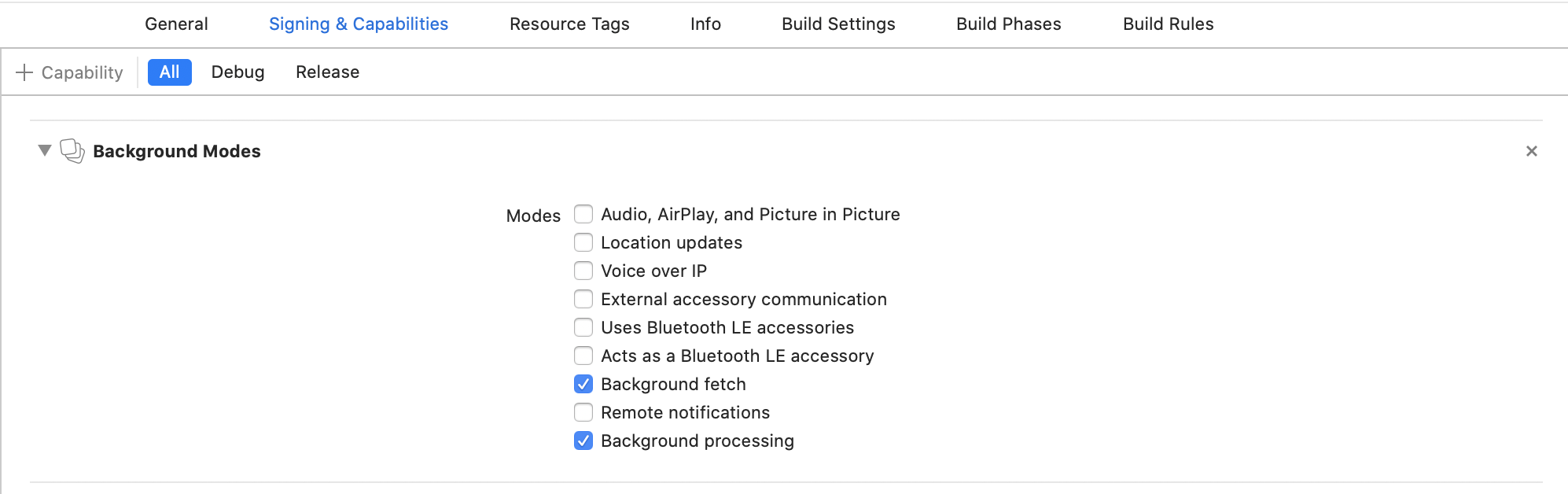
In Xcode, select your project root → Signing & Capabilities → + Capability → Background Modes. Enable:
- [x] Background fetch
- [x] Background processing (only if you intend to use
BackgroundFetch.scheduleTask)
Info.plist
If you intend to execute custom tasks via BackgroundFetch.scheduleTask, you must register their identifiers in your config.xml within the <platform name="ios"> block:
<platform name="ios">
    <config-file parent="BGTaskSchedulerPermittedIdentifiers"
                 target="*-Info.plist">
        <array>
            <string>com.transistorsoft.customtask</string>
        </array>
    </config-file>
</platform>
Warning
A task identifier can be any string you wish, but it must be prefixed with com.transistorsoft..
Note
The base identifier com.transistorsoft.fetch is registered automatically by the plugin — you do not need to add it to config.xml.