Setup

Installation
npm install react-native-background-fetch
yarn add react-native-background-fetch
iOS Setup
CocoaPods
cd ios && pod install
Background Modes
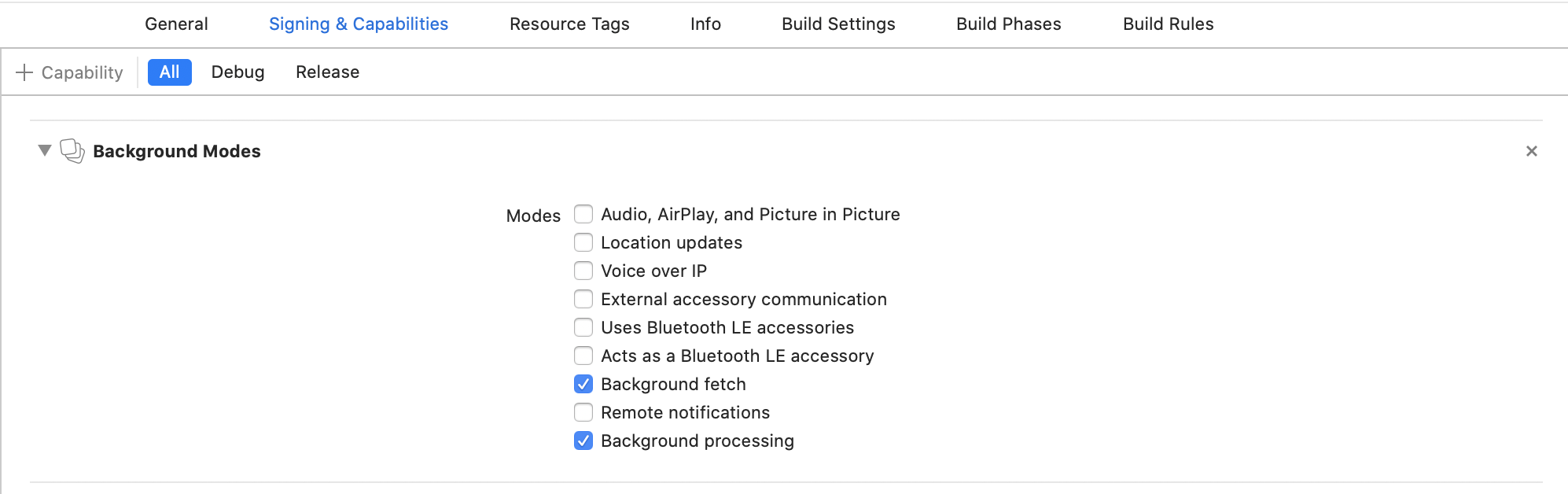
In Xcode, select your project root → Signing & Capabilities → + Capability → Background Modes. Enable:
- [x] Background fetch
- [x] Background processing (only if you intend to use
BackgroundFetch.scheduleTask)
Info.plist
Open your Info.plist and add the key "Permitted background task scheduler identifiers":
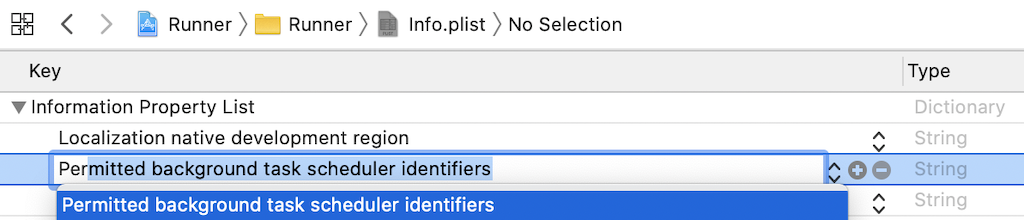
Add the required identifier com.transistorsoft.fetch:

If you intend to execute your own custom tasks via BackgroundFetch.scheduleTask, you must add those custom identifiers as well. For example, if you intend to execute a custom taskId: 'com.transistorsoft.customtask', you must add the identifier com.transistorsoft.customtask to your "Permitted background task scheduler identifiers", as well.
Warning
A task identifier can be any string you wish, but it must be prefixed with com.transistorsoft..
Android Setup
No Gradle configuration required
The native tsbackgroundfetch library is hosted on Maven Central and is resolved automatically. No custom maven URL or local libs repository is needed.
Installation
npx expo install react-native-background-fetch
The plugin ships with an Expo Config Plugin — it handles all native configuration automatically during expo prebuild. No manual edits to Info.plist, AppDelegate, or Background Modes are required.
app.json
Add the plugin to plugins and configure ios.infoPlist with the required background modes and task identifiers:
{
  "expo": {
    "plugins": [
      "react-native-background-fetch"
    ],
    "ios": {
      "infoPlist": {
        "UIBackgroundModes": [
          "fetch",
          "processing"
        ],
        "BGTaskSchedulerPermittedIdentifiers": [
          "com.transistorsoft.fetch"
        ]
      }
    }
  }
}
If you intend to execute your own custom tasks via BackgroundFetch.scheduleTask, you must add those custom identifiers as well to BGTaskSchedulerPermittedIdentifiers. For example, if you intend to execute a custom taskId: 'com.transistorsoft.customtask', add the identifier com.transistorsoft.customtask:
"BGTaskSchedulerPermittedIdentifiers": [
  "com.transistorsoft.fetch",
  "com.transistorsoft.customtask"
]
Warning
A task identifier can be any string you wish, but it must be prefixed with com.transistorsoft..
Prebuild
You must rebuild for the added plugins to be evaluated.
If you're developing locally:
npx expo prebuild
If you're using Expo EAS:
eas build --profile development --platform android