Capacitor — Setup

Installation
npm install @transistorsoft/capacitor-background-fetch
npx cap sync
yarn add @transistorsoft/capacitor-background-fetch
npx cap sync
iOS Setup
Background Modes
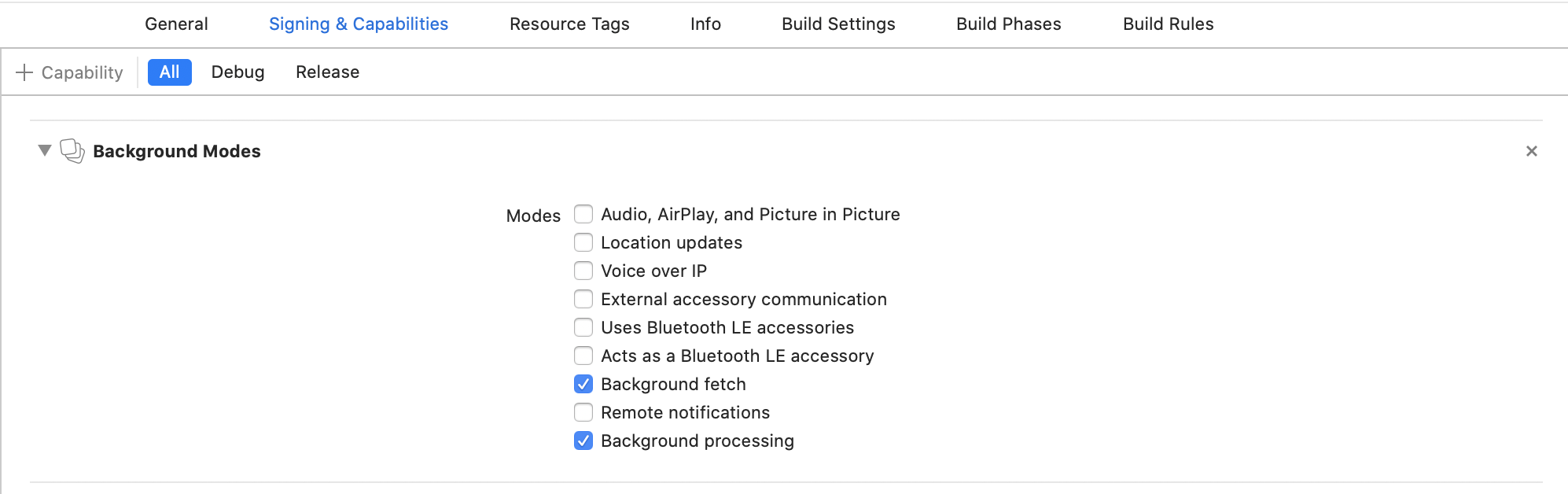
In Xcode, select your project root → Signing & Capabilities → + Capability → Background Modes. Enable:
- [x] Background fetch
- [x] Background processing (only if you intend to use
BackgroundFetch.scheduleTask)
Info.plist
Open your Info.plist and add the key "Permitted background task scheduler identifiers":
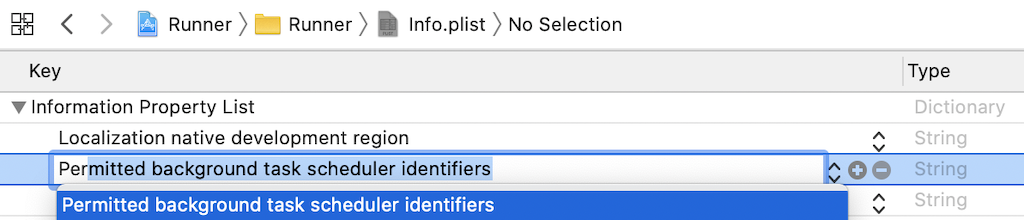
Add the required identifier com.transistorsoft.fetch:

If you intend to execute your own custom tasks via BackgroundFetch.scheduleTask, you must add those custom identifiers as well. For example, if you intend to execute a custom taskId: 'com.transistorsoft.customtask', you must add the identifier com.transistorsoft.customtask to your "Permitted background task scheduler identifiers", as well.
Warning
A task identifier can be any string you wish, but it must be prefixed with com.transistorsoft..
Android Setup
No additional Android setup is required.